How to Set Up a Simple Ticket System in 5 Minutes
Learn how to create a simple ticket system for your team without complex software. Step-by-step guide with free tools and best practices.
If you're still managing requests through email threads and chat messages, you know the pain: lost requests, missed follow-ups, and no visibility into who's handling what. The good news? Setting up a simple ticket system doesn't require enterprise software or a dedicated IT team.
In this guide, we'll show you how to get a functional ticket system running in under 5 minutes — no technical skills required.
Why You Need a Ticket System (Even If You're Small)
Many small teams resist ticketing systems because they seem like overkill. "We're only 5 people, we can just talk to each other." Sound familiar?
Here's the reality: even small teams benefit from structured request management:
- **Nothing falls through the cracks** — Every request is tracked from submission to completion
- **Fair workload distribution** — No more one person getting overwhelmed while others wait
- **Clear accountability** — Everyone knows who's responsible for what
- **Historical record** — Find past solutions without digging through old emails
What Makes a Ticket System "Simple"?
Before we dive in, let's define what "simple" means:
- **Quick setup** — Under 10 minutes, ideally under 5
- **No training required** — Your team can start using it immediately
- **Visual interface** — See status at a glance, not buried in lists
- **Flexible** — Works for IT requests, HR inquiries, facilities, or anything else
Complex enterprise tools fail on all four counts. They take weeks to configure, require training sessions, bury information in dropdown menus, and lock you into specific workflows.
Step-by-Step: Setting Up Your Ticket System
Step 1: Create Your First Space (1 minute)
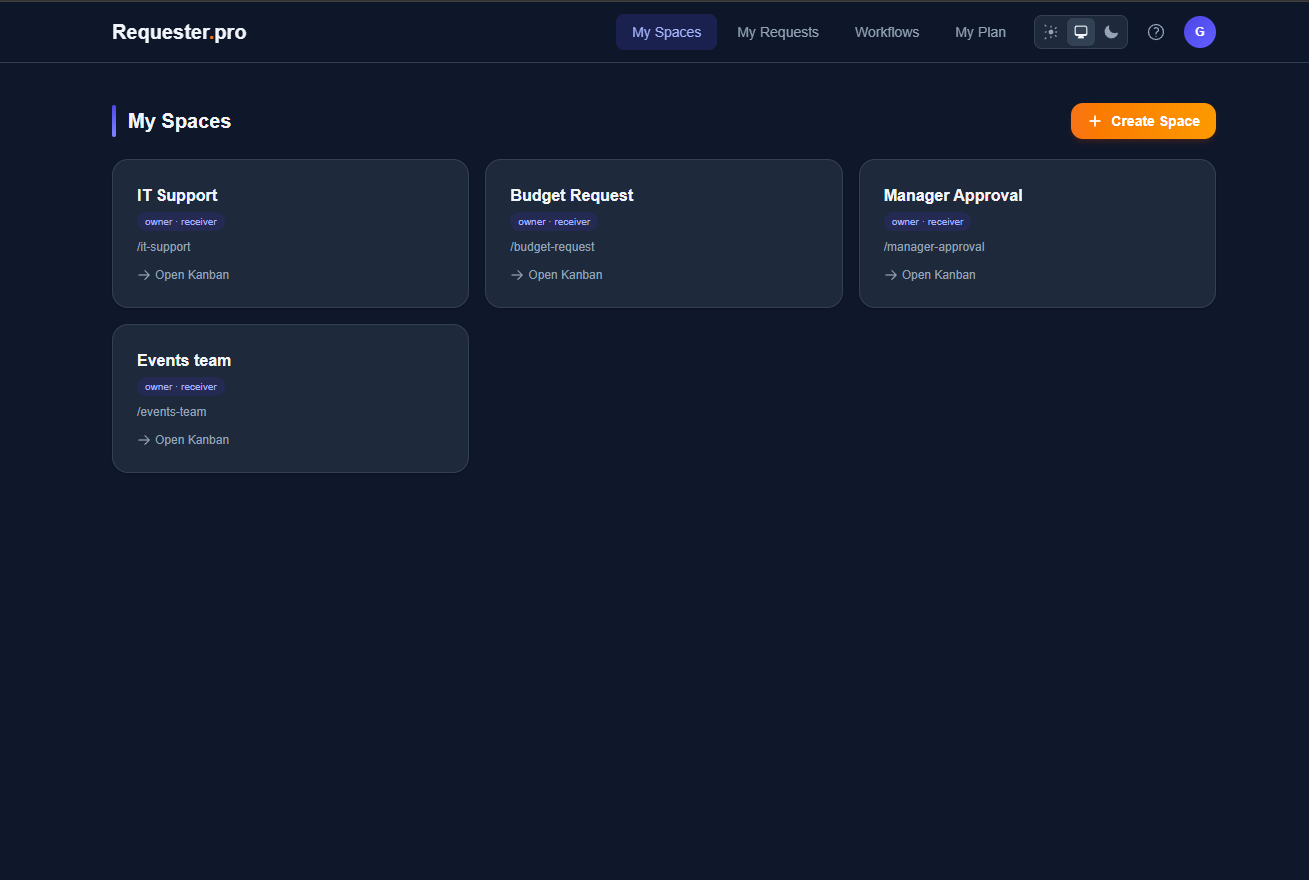
A "space" is simply a board where requests live. Think of it as a dedicated inbox for a specific type of request.
Start with one space for your most common request type. For most teams, this is either:
- IT Support (laptop issues, software requests, access problems)
- General Internal Requests (office supplies, questions, help needed)
Name it something clear like "IT Support" or "Team Requests."
Step 2: Define Your Columns (1 minute)
The simplest setup uses three columns:
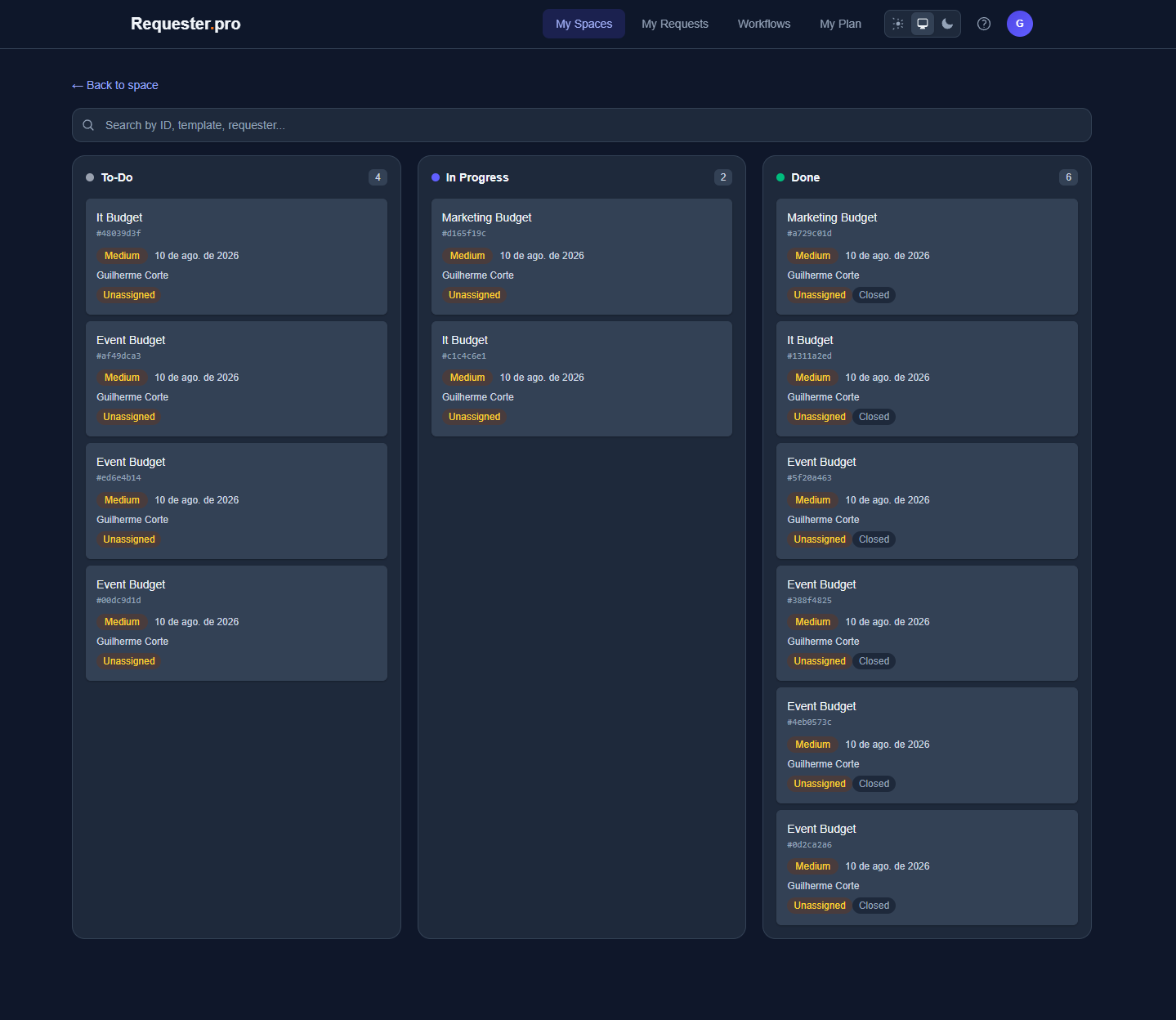
- **New** — Requests waiting to be picked up
- **In Progress** — Someone is actively working on it
- **Done** — Completed and closed
That's it. Resist the urge to add more columns initially. You can always refine later.
Step 3: Create a Request Form (2 minutes)
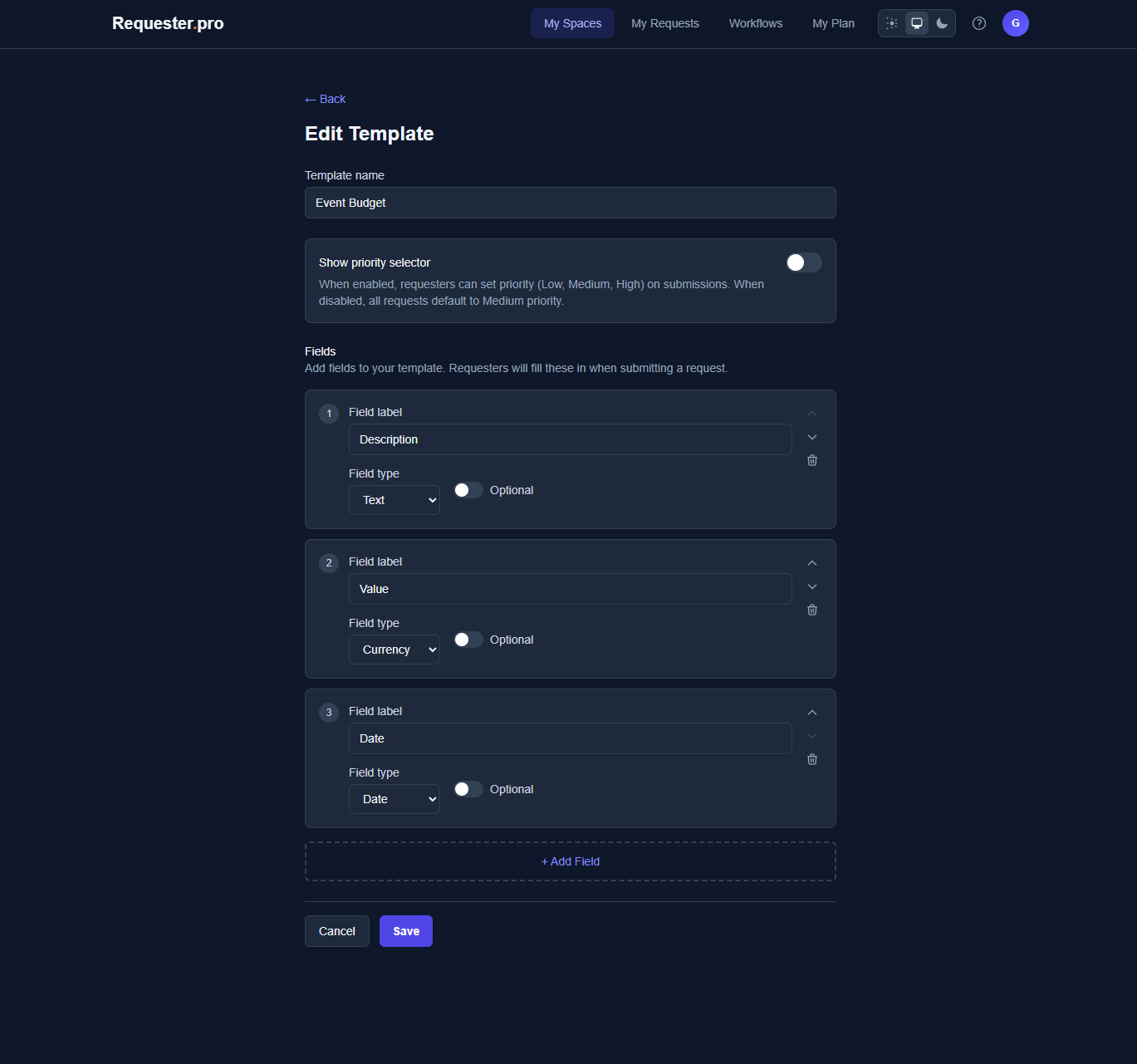
Your form should capture just enough information to act on a request:
- **Title** — What's the request about? (required)
- **Description** — More details (required)
- **Priority** — Low / Medium / High (optional but helpful)
- **Category** — Type of request (optional)
Don't add fields you won't use. Every extra field adds friction for submitters.
Step 4: Add Your Team (1 minute)
Invite team members who will:
- **Submit requests** — Anyone who needs help
- **Handle requests** — Your support team or whoever fulfills requests
With auto-assignment enabled, incoming requests distribute fairly across handlers based on current workload.
Step 5: Share the Link
Share your space's submission link with your team. They can bookmark it or you can add it to your internal wiki/Slack.
Done. You now have a working ticket system.
Best Practices for Keeping It Simple
Start with One Space
It's tempting to create spaces for everything immediately. Resist this. Start with one, learn what works, then expand.
Use the Kanban View
Visual boards beat list views for ticket management. You can see at a glance:
- How many requests are waiting
- Who's working on what
- What's been completed recently
Enable Auto-Assignment
Manual assignment creates bottlenecks. Auto-assignment distributes work fairly and ensures no request sits unassigned.
Set Expectations with Requesters
Let people know:
- Where to submit requests (the link)
- What information to include
- Typical response time
A quick message in Slack or a line in your wiki prevents 80% of "is this the right place?" questions.
Common Mistakes to Avoid
Over-Engineering from Day One
You don't need:
- 10 different priority levels
- Complex approval chains
- Detailed SLA tracking
Start simple. Add complexity only when you feel actual pain, not anticipated pain.
Treating Every Request the Same
Some requests need quick answers. Others require deep work. Use priority fields to distinguish, but don't create elaborate triage processes.
Forgetting to Close Tickets
A ticket system only works if tickets get closed. Make it a habit to close resolved requests immediately. This keeps your board clean and your metrics accurate.
When to Level Up
You've outgrown a simple setup when:
- You need to **connect departments** — IT requests that need procurement approval
- You need **audit trails** — Compliance or legal requirements
- You have **multiple teams** handling different request types
- Requesters need **status visibility** without asking
At that point, look for tools that support connected workflows and role-based permissions — but still keep the core experience simple.
Ready to Try It?
Setting up a simple ticket system doesn't have to be a project. With the right tool, you can go from chaos to organized in minutes.
Requester.pro is built exactly for this: visual Kanban boards, fair auto-assignment, and custom forms — all without the enterprise complexity. The free tier includes 2 spaces and 40 requests/month, enough for most small teams to get started.
Frequently Asked Questions
Do I need technical skills to set up a ticket system?
No. Modern ticket systems like Requester.pro are designed for non-technical users. If you can use email, you can set up a ticket system.
How is a ticket system different from a shared inbox?
A shared inbox shows messages. A ticket system tracks status, assigns ownership, and provides visibility. You always know what's pending, in progress, and done.
What if my team resists using a new tool?
Start small. Use it for one type of request. Once people see requests stop falling through the cracks, adoption happens naturally.
Can I migrate from email/spreadsheets to a ticket system?
Yes, but don't try to migrate history. Start fresh with the ticket system. Old requests can stay where they are; new ones go into the system.
How many tickets can a small team handle?
With proper tooling, a team of 3-5 can comfortably handle 50-100 tickets per month. The limit isn't volume — it's visibility. A good system makes high volume manageable.