5 Signs You've Outgrown Spreadsheets for Request Management
Still tracking requests in Excel or Google Sheets? Here are 5 clear signs it's time to upgrade to a proper request management system.
Spreadsheets are the duct tape of business operations. Need to track something? Make a spreadsheet. It's fast, flexible, and everyone knows how to use one.
But here's the thing about duct tape: it works great for quick fixes, not permanent solutions. If you're still managing team requests in Excel or Google Sheets, you might be feeling the strain.
Here are five signs it's time to graduate to a proper request management system.
Sign 1: Requests Are Falling Through the Cracks
The classic symptom. Someone submitted a request two weeks ago. It's still sitting in row 47, marked "pending," and no one remembers why.
Spreadsheets don't nag you. They don't send reminders. They just sit there, holding data, while requests age into irrelevance.
**The real problem:** Spreadsheets show data, but they don't drive action. There's no concept of "assigned to" that triggers notifications, no status change that alerts the team, no aging indicator that surfaces forgotten requests.
**What you need instead:** A system that actively surfaces what needs attention. Visual boards where "stuck" items are obvious. Auto-assignment so nothing sits unowned. Notifications when things don't move.
Sign 2: You Spend More Time Managing the Sheet Than Doing the Work
Monday morning ritual: Open the spreadsheet. Scroll through to find your items. Update a few statuses. Wonder if that row was yours or someone else's. Notice the formatting is broken again. Fix it. Realize someone added a column and now your filters don't work.
Sound familiar?
When the tool becomes the work, something's wrong. Spreadsheets require constant maintenance:
- Keeping formats consistent
- Fixing broken formulas
- Managing conflicting edits
- Remembering which row you were on
**The real problem:** Spreadsheets weren't designed for collaborative workflows. They're designed for data storage and calculation.
**What you need instead:** A system built for workflow management. Drag-and-drop status updates. Automatic timestamps. Consistent structure that users can't accidentally break.
Sign 3: No One Knows Who's Working on What
"Is anyone handling the laptop request from Marketing?"
"I thought you had it."
"No, I did the other one."
"Which other one?"
In a spreadsheet, assignment is just text in a cell. There's no guarantee that person knows they're assigned, no visibility into their current workload, no way to balance distribution.
**The real problem:** Assignment without accountability. Writing someone's name in a cell doesn't mean they'll see it, act on it, or even know about it.
**What you need instead:** Real assignment with notifications. A view of who has what. Auto-assignment based on capacity. Clear ownership that's impossible to miss.
Sign 4: Getting Updates Requires Asking
"Hey, what's the status on the printer request?"
"Let me check the spreadsheet... uh, it says 'in progress.'"
"What does that mean? When will it be done?"
"I don't know, I'd have to ask Dave."
Three people involved just to get a status update. Multiply by every request, and you've got a communication overhead that dwarfs the actual work.
**The real problem:** Spreadsheets are internal tools. Requesters can't easily check status without access, training, and knowing where to look.
**What you need instead:** Self-service status visibility. Requesters can check their own tickets without asking. Updates notify relevant parties automatically.
Sign 5: You Can't Answer Basic Questions About Your Workload
Your manager asks: "How many requests did we handle last month? What's our average resolution time? Which categories take the longest?"
Your answer: "Uh... let me export this to a pivot table and get back to you."
Spreadsheets can technically do reporting, but it requires manual effort every time. And if someone's been sloppy with data entry, your reports are garbage anyway.
**The real problem:** Spreadsheets don't track metadata automatically. There's no timestamp when status changes, no log of who did what, no built-in analytics.
**What you need instead:** Automatic tracking. Know when tickets were created, updated, and resolved. See trends without building reports from scratch.
Why Teams Stick with Spreadsheets (And Why It's Okay to Move On)
Spreadsheets persist because they're:
- **Free** — No budget approval needed
- **Familiar** — Everyone already knows Excel/Sheets
- **Flexible** — Can adapt to anything quickly
- **Low commitment** — Easy to start, easy to abandon
These are real advantages. The question isn't whether spreadsheets are bad — they're not. The question is whether they're still the right tool for your current needs.
If you're experiencing multiple signs above, the answer is probably no.
What to Look for in a Replacement
Moving from spreadsheets doesn't mean moving to enterprise software. Look for tools that preserve spreadsheet advantages while adding what's missing:
Keep the Simplicity
- Setup in minutes, not weeks
- No training required
- Intuitive interface your team can use immediately
Add What's Missing
- Visual status tracking (Kanban boards)
- Real assignment with notifications
- Automatic workload distribution
- Self-service for requesters
- Built-in reporting
Avoid the Overkill
- No complex configuration wizards
- No mandatory fields you don't need
- No features you'll never use
- No pricing that punishes growth
Making the Switch
Transitioning from spreadsheets doesn't have to be painful:
Don't Migrate Everything
Start fresh with the new system. Your spreadsheet history can stay where it is for reference. Trying to import old data usually creates more problems than it solves.
Run Parallel Briefly
For one week, use both systems. This helps catch anything you might have missed and gives the team time to adjust.
Make It the Path of Least Resistance
People default to familiar tools. Make the new system easier than the spreadsheet:
- Pin the submission link in Slack/Teams
- Remove edit access to the old spreadsheet
- Respond only to requests in the new system
Celebrate Quick Wins
When the first request gets resolved faster than it would have in the spreadsheet, share it. Adoption follows success.
The Right Time to Switch
There's no perfect moment. If you're feeling spreadsheet pain, the right time is now. Every week you wait is another week of:
- Lost requests
- Wasted coordination time
- Missing visibility
- Frustrated team members
Modern request management tools are free to start and quick to set up. The switching cost is lower than the ongoing cost of spreadsheet friction.
Try It Today
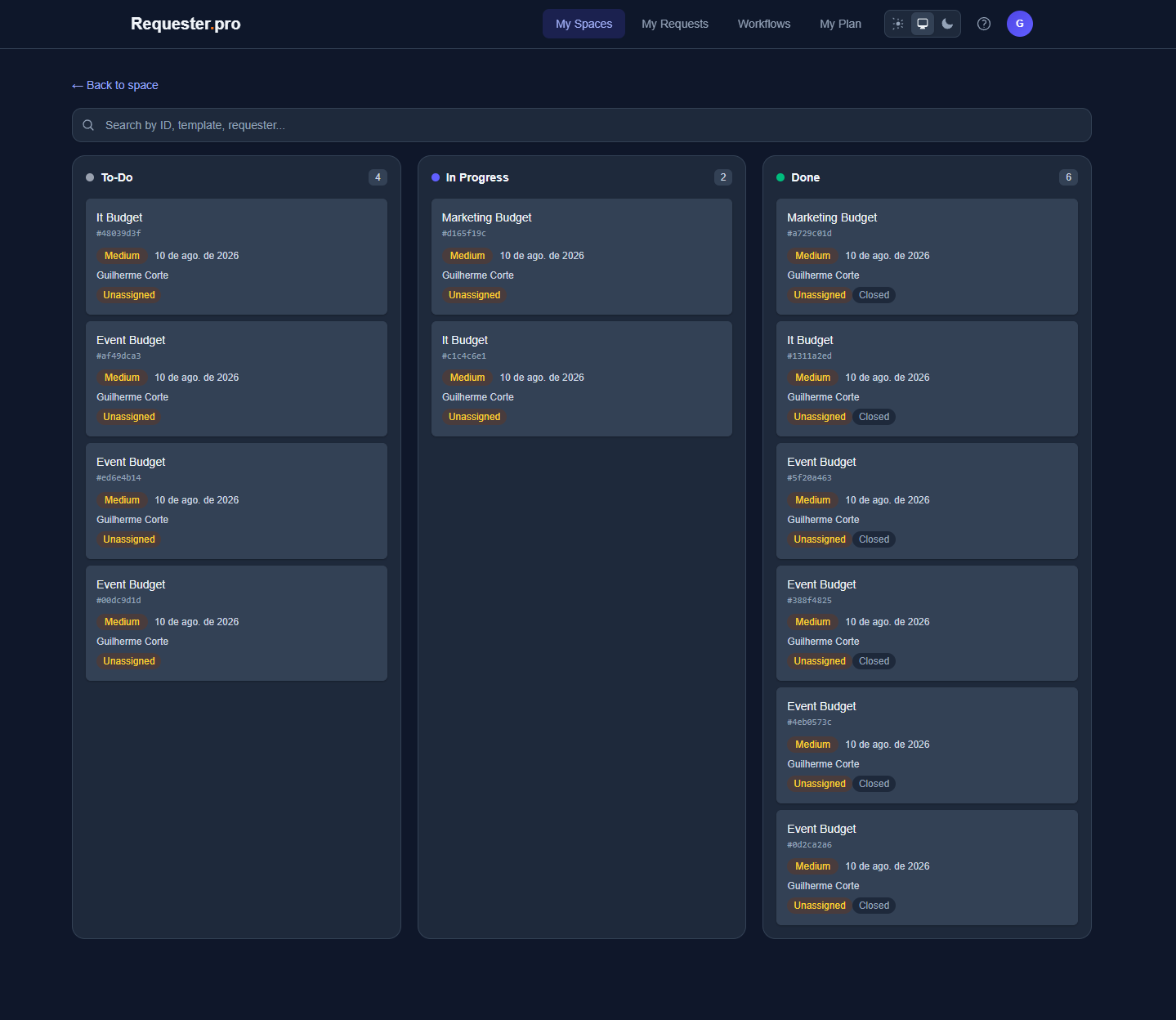
Requester.pro replaces your request-tracking spreadsheet with visual Kanban boards, fair auto-assignment, and self-service status for requesters. Free tier, 5-minute setup, no spreadsheet maintenance required.
Frequently Asked Questions
Can I still export to spreadsheets if I need to?
Yes, any decent request management tool lets you export data. You get the best of both worlds: proper workflow management day-to-day, spreadsheet flexibility when you need it.
What if my team resists change?
Start with one type of request. Prove the value, then expand. Forced adoption fails; demonstrated value succeeds.
How long does migration take?
If you're not importing old data, you can switch in a day. Set up the new system in the morning, announce it after lunch, start using it the next day.
Will I lose the flexibility of spreadsheets?
Good request management tools are flexible too — custom fields, custom workflows, adaptable forms. You'll likely find you didn't need as much flexibility as you thought.
What if the new tool doesn't work out?
Your data is exportable, and you can always go back to spreadsheets. The risk of trying is low; the cost of not trying is ongoing friction.